Handoff
Send a project to one of your own machines so the agent keeps working with your laptop closed, follow the run from your phone, and bring the work home with Take back.
A handoff moves a project to one of your machines and keeps the agent working there while your laptop is closed. When you are back, Take back brings the project home the way the agent left it.
This is different from Remote Control, where your phone is a window onto this desktop. A handoff runs on the other machine, and your desktop does not have to be awake at all.
Before the first handoff
Open Settings → Machines, pick a machine and choose Handoff. The sheet checks the box and lists what is still missing, with the fix next to each item:
| It needs | Why |
|---|---|
git | Carries your history and uncommitted work. |
rsync | Copies the project there and back, sending only what changed. |
node 18 or newer | Runs the agent command-line tools. |
| systemd user services | The run survives your SSH session ending. |
| Stay running after logout | Without it, everything stops when the last session ends and nobody restarts it. |
tmux (optional) | Keeps plain shell tabs alive. Agents do not use it. |
Install all missing does the lot, or install them one at a time. Every command is shown in full before it runs, with a Copy button if you would rather paste it into your own terminal.
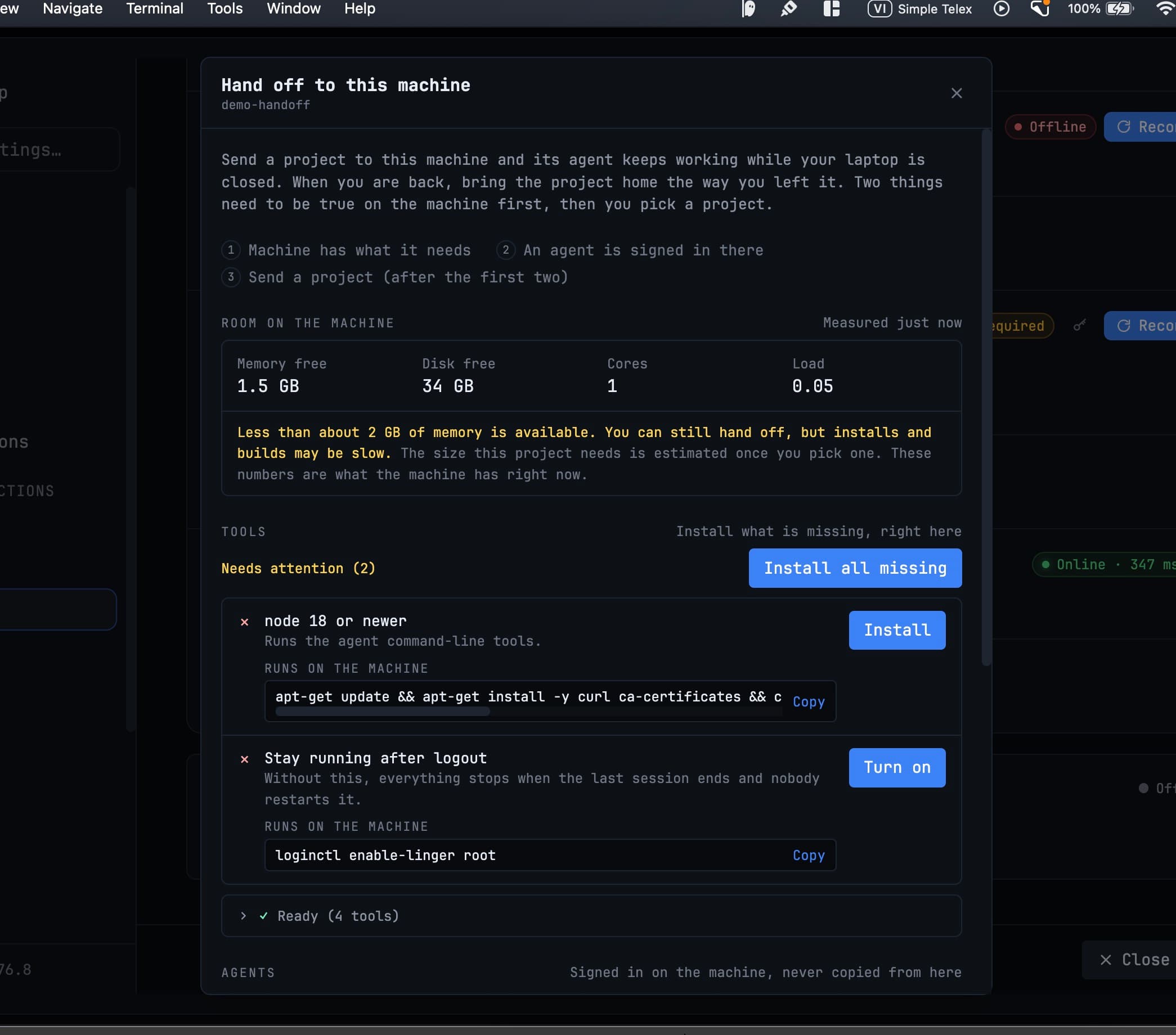
The sheet also measures room on the machine — free memory, free disk, cores and load — and says so plainly when there is not much of it, rather than letting you wonder later why the build crawled.
Signing the agent in is deliberately manual
You log into Claude or Codex on the machine, in a real terminal. 1DevTool does not copy a credential off this computer, and the sheet says as much: signed in on the machine, never copied from here. Your agent config goes over with any local-only paths and MCP commands rewritten for the box.
Handing a project off
Pick Hand off to a machine… from the project's sidebar menu. It is also on the machine's row in Settings → Machines and in the handoff task view.
The sheet asks for four things:
- The machine and the agent to run it.
- A conversation — continue an existing one, or start a new one. The agent runs without a screen; you read its log.
- What it should do next, in your own words — "Finish the migration, run the tests, and fix what fails."
- Confirmation that nothing is running on this project here, so the copy is not taken mid-edit. Editing pauses locally while the project is away.
Tick Run without asking if there is nobody around to approve prompts; without it the agent stops at the first one. It only affects the machine, never this computer.
Anything still standing between you and the handoff is listed as a chip you can click to jump straight to that field.
What gets copied
The whole project, its git history and the conversation, carried by rsync:
- Tracked and untracked files
- Staged and unstaged changes
- Deletions, executable bits and symlinks
.gititself
So there is no "push to GitHub first" — the machine starts from exactly what is on your disk, half-finished edits included.
Left out shows the patterns being skipped as chips you can untick, and Also leave out takes extra ones. Folders named build, dist or target are kept on purpose: they often hold real source.
Your .env travels too — written over stdin, chmod 600, replaced atomically. The file and variable names are shown to you; the values are never logged.
Once it lands, the agent runs as a systemd --user unit. That is what lets the laptop close.
Follow-ups queue on the machine
Type the next instruction at any time, including while a run is in flight. The machine holds it and starts it the moment the current run ends — with your laptop closed, or quit. The queue lives on the box, not in your app.
The task view streams the machine's log back: assistant text, tool calls, results and exit status, with every run numbered.
Open on phone
Open on phone is on the handoff success screen, the task view and the machine row. Scan the QR code with your phone's camera and the page opens in Safari or Chrome — there is no app to install, and the page is served by the machine, over a Cloudflare quick tunnel, so it keeps working with your laptop shut.
From the phone you can:
- Follow the live log — the same entries the desktop task view shows.
- Send the next instruction — queued if a run is in flight, started now if not.
- Stop the current run.
- Open a shell. A 6-digit Admin PIN opens a
tmuxshell on the machine in the phone's browser. It survives closing the tab and resizes to the screen. - Get a push notification when a run ends — one per ended run, and when the queue moves on. Android Chrome works today; on iPhone, add the page to your Home Screen first.
The scan screen lists every open phone session with Sign out all, and Turn off kills the link altogether. New code issues a fresh QR code and PIN without signing existing phones out. Taking the last handoff back on a machine turns phone access off on its own.
cloudflared on the machine is checked against its GitHub release digest before it runs.
Take back
Take back returns the work in an order that cannot lose anything:
- The machine's queue is held, so no new run can start underneath you.
- The current run is stopped.
- The project is rsynced home with the agent's changes.
- The units created on the machine are cleaned up.
Patterns that were excluded on the way out are reused on the way back, so a take-back never deletes something that was never sent.
Related
- Machines — the roster a handoff picks from, and where the agent runs
- Control 1DevTool From Your Phone — the other phone surface, pointed at this desktop
- SSH Keys