Parallel Claude Accounts
Run Claude terminals on different accounts at the same time — each saved account signs in to its own config home, with the account on every tab and quota that follows the terminal.
Every saved Claude account can have its own login, so Claude terminals on different accounts run side by side. For example, your Team seat can run in one pane and your personal plan in the next. Nothing swaps the machine-wide login underneath running work, and the quota readout follows the terminal you are looking at.
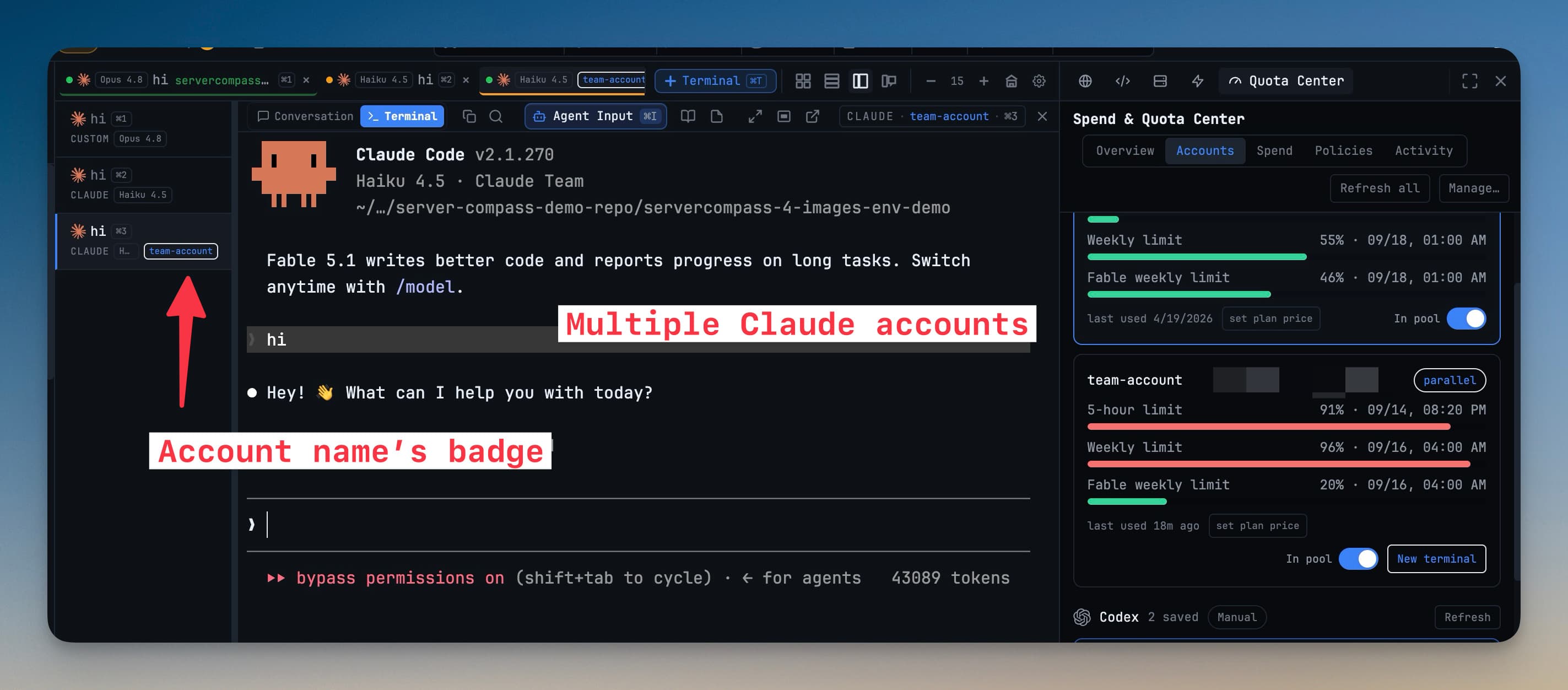
Parallel accounts are for Claude Code 2.1.270 or newer. Older versions don't keep logins separate, and 1DevTool asks you to update before adding one. Other agents still switch one login at a time. See Accounts & Quota.
How it works
Each account lives in its own config home under ~/.1devtool/ai-pool/claude/homes/, and Claude is launched with CLAUDE_CONFIG_DIR pointing at it. Every home stores its own credential. On macOS that is a separate Keychain entry, and on Linux and Windows it is the home's own credentials file.
Your history, projects, skills, plugins, settings.json and CLAUDE.md are linked back to your usual ~/.claude. Resuming a session and your settings therefore work the same on every account.
The login your computer already has stays untouched. It is listed as This Mac's Claude login with a System tag, and terminals on it launch exactly as before.
Add an account
- Open Accounts & Quota (
Cmd+Shift+U/Ctrl+Shift+U) and go to the Accounts tab. Before v1.77.0 this lived in Settings → Agents → Accounts. - Click Add account, pick Claude, then Open login terminal. A terminal named Claude sign-in opens and runs
claude auth loginin a fresh config home. - Finish the sign-in in your browser, then name the account. It appears in the list as a parallel · own config home account.
You can't add the account your computer is already signed in with. It is already the system account.
Pick the account for a terminal
Once at least one parallel account exists:
- Add Terminal shows an Account picker when Claude is the agent (and for Codex, Gemini, Qwen, OpenCode and Grok too), with each account's 5-hour and weekly quota. Choose Auto, any saved account or This Mac’s login. See Choosing which account it starts on.
- The terminal's tab and pane header show the account name as a badge. Hover it to see Account: ….
- The Default picker beside Claude in Accounts & Quota → Accounts sets which account new Claude terminals start on when you don't pick one.
Each account card also has New terminal, which opens a terminal already on that account. Copy command for other terminals in the card's menu copies the command that starts claude on that account from any shell.
Quota per account
- The quota pill and quota alerts report the account the focused terminal is on.
- Each account's five-hour and seven-day limits are read from Claude's own status line, so fresh numbers need no extra sign-ins. This works on macOS and Linux.
- Accounts & Quota → Accounts shows every account's limits, a parallel · own config home or legacy · shared login tag, and a New terminal button.
When a quota alert names a spare account with room, it offers Relaunch on that account. The focused terminal is stopped, started again on the other account, and its session is resumed. New terminal on that account opens a fresh terminal instead.
Keep accounts healthy
- Re-login (on the card, or in its menu) opens a sign-in terminal on the same config home. Use it when a token has expired. The account keeps its label and quota history.
- Rename an account with the pencil beside its name in Accounts & Quota, or Rename in its menu. The new name shows on its terminals.
- Wrong account warning. If a terminal comes up on a different login than the one it was assigned, you get an attention item: This terminal is running as a different Claude account than assigned. Close and relaunch it on the account to fix billing/quota attribution.
Accounts saved before v1.74.1
Accounts saved earlier keep working the old way, one live login at a time, and are tagged legacy · shared login. Click Sign in to run in parallel on one to move it into its own config home. The older global switch is still in the card's menu as Switch global login (legacy).